Resume Formats with Examples
 Ayush Panthri · 10 min read
Choosing the right resume format can significantly improve your chances of getting shortlisted. A well-structured, ATS-friendly resume makes it easier for recruiters to find your skills, experience, and qualifications quickly.
A resume format determines how your information is organized, including the order of sections and how your work experience is presented. The best format depends on your career stage. For example, freshers, experienced professionals, and career changers often benefit from different resume formats.
In this guide, you’ll learn about the three main resume formats, when to use each one, and how to choose the best format for your experience level. You’ll also find resume examples and ATS-friendly formatting tips to help you create a resume that stands out.
By end of this you”ll know
What Are the Three Types of Resume Formats?
There are three main types of resume formats used by job seekers: Reverse Chronological, Functional, and Combination. Each format organizes your skills, work experience, and qualifications differently to suit different career situations. Let’s understand each resume format, when to use it, and its advantages and disadvantages.
1. Reverse Chronological Resume Format
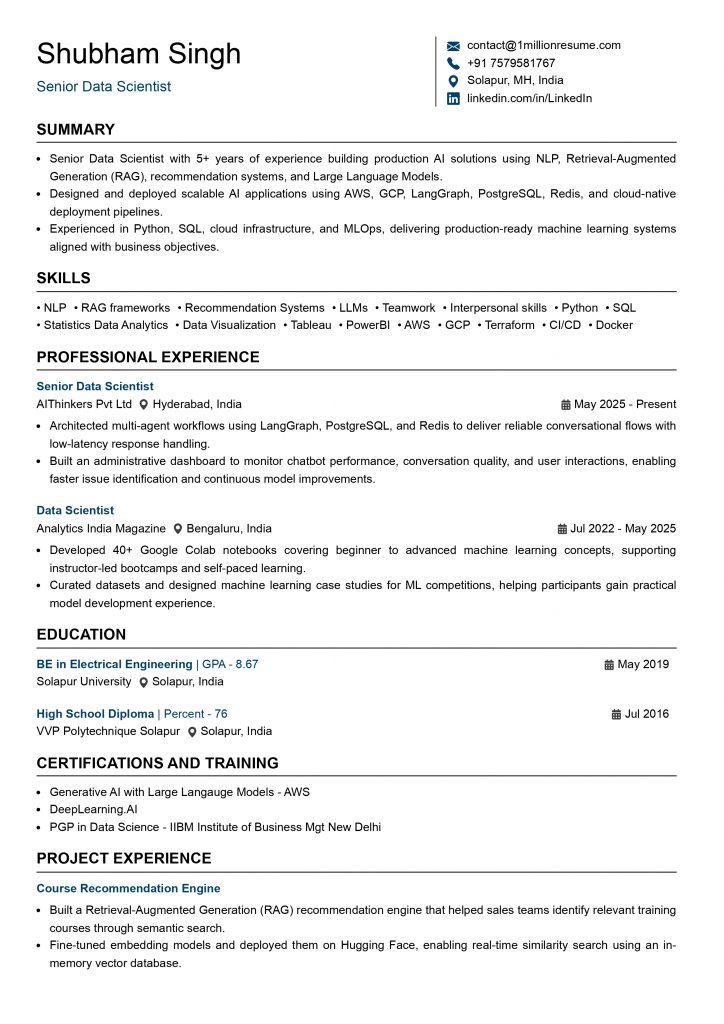
The Reverse Chronological Resume Format is the most widely used and recruiter-preferred resume format. It lists your most recent work experience first, followed by your previous roles in reverse chronological order. This format makes it easy for recruiters to quickly understand your career progression, recent responsibilities, and achievements.
The reverse chronological format is also the most ATS-friendly resume format. Most Applicant Tracking Systems (ATS) can easily scan this layout, making it the recommended choice for the majority of job seekers.
Example Reverse Chronological Resume Format
When Should You Use a Reverse Chronological Resume?
This format is ideal if you:
- Have a consistent work history with no major employment gaps.
- Have relevant work experience related to the job you’re applying for.
- Want to highlight your career growth and recent achievements.
- Are applying to companies that use Applicant Tracking Systems (ATS).
Best for: Experienced professionals, freshers with internships, recent graduates, and job seekers with a steady career history.
The table below shows the key advantages and disadvantages of the Reverse Chronological Resume Format.
| Advantages | Disadvantages |
|---|---|
| • Most preferred format by recruiters and hiring managers. • Highly ATS-friendly and easy to scan. • Clearly showcases your career progression. • Highlights your most recent experience first. • Suitable for most industries and job roles. | • Employment gaps are more noticeable. • Less suitable for career changers with unrelated work experience. • Doesn’t emphasize skills as much as other resume formats. |
2. Functional Resume Format
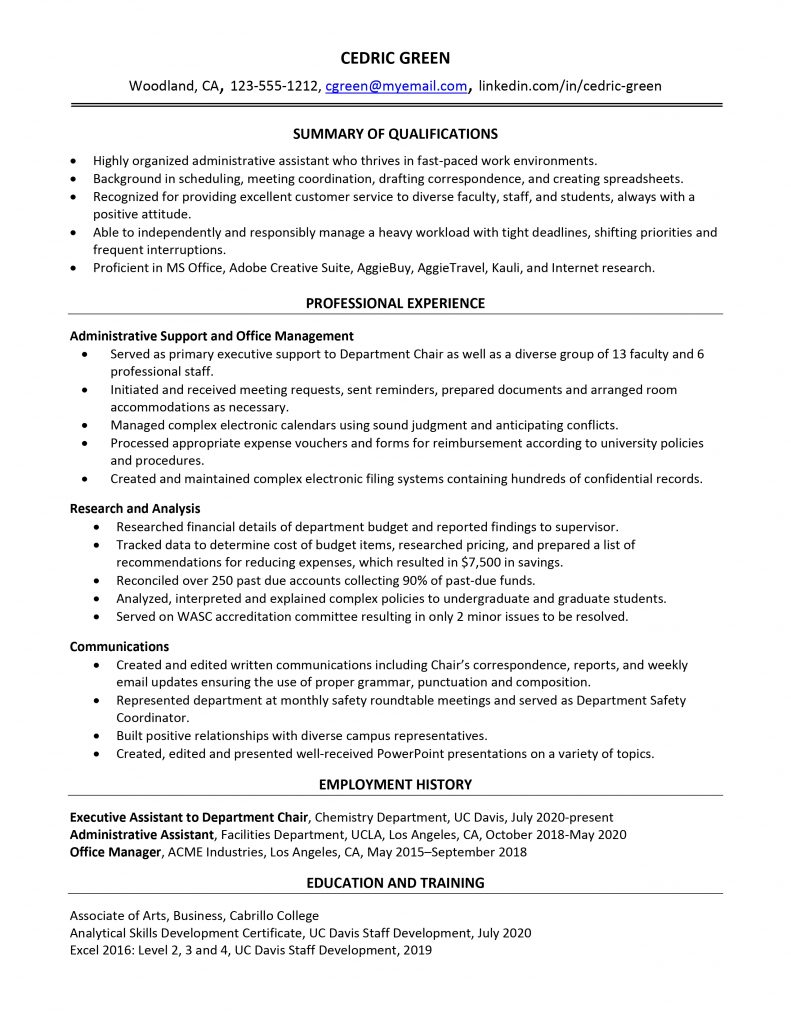
The Functional Resume Format, also known as a skills-based resume, focuses on your skills and abilities rather than your work history. Instead of listing your work experience at the top, this format highlights your most relevant skills first, followed by a brief employment history.
A functional resume can be useful if you have limited work experience, employment gaps, or are changing careers. However, many recruiters and Applicant Tracking Systems (ATS) prefer resumes that show a clear work history, so this format is less commonly recommended.
Example Functional Resume Format
When Should You Use a Functional Resume?
A functional resume is best when you want to highlight your skills rather than your work history. You should consider this format if you:
- You’re changing careers. For example, you’re moving from Customer Support to Data Analytics or from Sales to Digital Marketing and want to emphasize transferable skills.
- You have significant employment gaps. For example, you took a career break for higher education, family responsibilities, or personal reasons.
- You have little or no relevant work experience. This is common for freshers, recent graduates, or professionals entering a new field.
- Your skills are more relevant than your previous job titles. For example, you’ve developed SQL, Python, or Power BI skills through certifications, freelance work, or personal projects, but your previous job doesn’t reflect them.
The table below compares the advantages and disadvantages of the Functional Resume Format.
| Advantages | Disadvantages |
|---|---|
| • Highlights your most relevant skills and strengths. • Reduces the focus on employment gaps. • Useful for career changers and candidates with limited experience. • Helps showcase transferable skills from different roles or industries. | • Less preferred by recruiters and hiring managers. • Not as ATS-friendly as the reverse chronological format. • Provides limited information about career progression. • May raise questions about your work history during the hiring process. |
3. Combination Resume Format
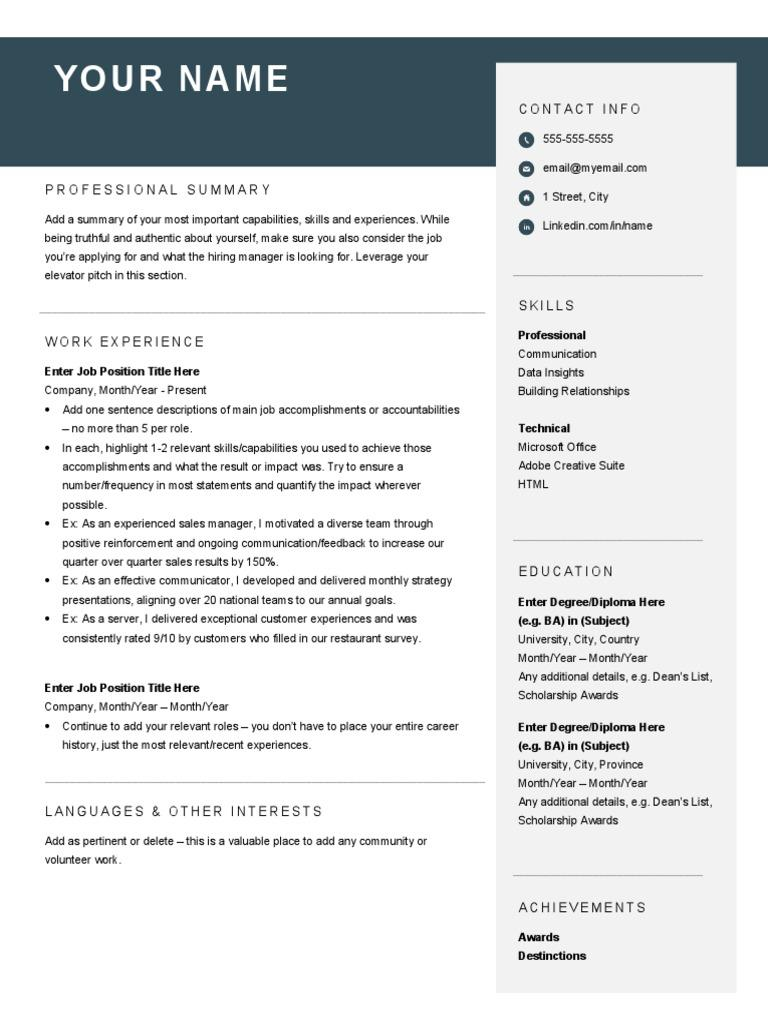
The Combination Resume Format, also known as the Hybrid Resume Format, combines the best features of both the Reverse Chronological and Functional resume formats. It highlights your key skills and qualifications at the top while also providing a detailed work experience section in reverse chronological order.
This format allows you to showcase both your technical skills and your professional experience, making it a good choice for candidates with several years of experience or those transitioning into a related role.
Example Combination (Hybrid) Resume Format
When Should You Use a Combination Resume?
A combination resume is ideal if you want to showcase both your technical skills and your professional experience. This format works well if you:
- Have several years of relevant work experience. For example, you’re a Software Engineer, Data Analyst, Business Intelligence Analyst, or Digital Marketer with 5+ years of experience and multiple successful projects.
- Want to highlight both your skills and work experience. For example, you have expertise in SQL, Power BI, Python, or AWS and want to demonstrate how you’ve applied these skills to deliver measurable business results.
- Are changing careers but have transferable skills. For example, you’re moving from Business Analysis to Product Management or from Software Development to Data Engineering and want to emphasize both your previous experience and relevant technical skills.
- Are applying for senior, technical, or specialized roles. For example, you’re applying for positions such as Senior Software Engineer, Business Intelligence Analyst, Data Engineer, Cloud Engineer, DevOps Engineer, or Solution Architect, where recruiters expect to see both technical expertise and proven achievements.
The table below compares the advantages and disadvantages of the Combination Resume Format.
| Advantages | Disadvantages |
|---|---|
| • Highlights both your skills and professional experience. • Allows you to showcase technical expertise and career achievements. • Suitable for experienced professionals and career changers. • Flexible format for demonstrating transferable skills. | • Can become longer than one page if not organized properly. • Requires careful formatting to maintain readability. • May include repeated information between the skills and experience sections. • Slightly less ATS-friendly than a well-structured reverse chronological resume if overdesigned. |
Which Resume Format Is Best?
There isn’t a single resume format that’s best for everyone. The right choice depends on your work experience, career goals, and the job you’re applying for. However, for most job seekers, the Reverse Chronological Resume Format is the best option because it’s easy for recruiters to read and highly compatible with Applicant Tracking Systems (ATS).
Our Recommendation:
- Choose the Reverse Chronological Resume Format if you have a consistent work history and want the highest chance of passing ATS screening.
- Choose the Functional Resume Format only if you have significant employment gaps or are making a complete career change.
- Choose the Combination Resume Format if you have strong technical skills, several years of experience, and want to highlight both your expertise and work history.
Best Resume Format by Career Level
Resume format depends on where you are in your career. A fresher with little or no work experience needs a different approach than someone with several years of professional experience. Choosing the right format helps recruiters quickly identify your strengths and improves your chances of getting shortlisted.
The table below shows the recommended resume format for each career level and what recruiters expect to see.
| Career Level | Best Resume Format | What to Highlight |
|---|---|---|
| Freshers | Reverse Chronological | Education, internships, academic projects, certifications, technical skills, and achievements. Recruiters expect to see your potential, relevant skills, and hands-on project experience. |
| Entry-Level (1–3 Years) | Reverse Chronological | Recent work experience, measurable achievements, technical skills, certifications, and career progression. Focus on the impact you’ve made in your roles. |
| Experienced Professionals (3–10 Years) | Reverse Chronological (Recommended) or Combination | Highlight professional experience, key accomplishments, leadership responsibilities, technical expertise, and business impact. Use the Combination format only if you’re applying for specialized or technical roles. |
| Senior Professionals (10+ Years) | Combination | Showcase leadership experience, strategic initiatives, major projects, business impact, technical expertise, and measurable achievements. Focus on results rather than day-to-day responsibilities. |
Looking for resume samples for your target job role? Check out our resume examples and use them as a reference while creating your own resume.
Resume Format vs Resume Template
A resume format determines how your information is organized, while a resume template defines its visual design. The table below explains the key differences between a resume format and a resume template.
| Resume Format | Resume Template |
|---|---|
| Defines how your resume is organized. | Defines how your resume looks. |
| Determines the order of sections like Summary, Experience, Skills, and Education. | Controls fonts, colors, spacing, and overall design. |
| Examples: Reverse Chronological, Functional, Combination. | Examples: Modern, Professional, Minimalist, Creative. |
| Helps present your experience effectively. | Helps make your resume visually appealing while maintaining readability. |
Need a ready-to-use ATS-Friendly Templates? Browse our collection of ATS-friendly resume templates and customize one for your target job role.
ATS-Friendly Resume Format
An ATS-friendly resume uses a simple layout that both recruiters and Applicant Tracking Systems (ATS) can read easily. Using the right format improves your chances of passing ATS screening and getting shortlisted.
How to Make Your Resume ATS-Friendly
Follow these best practices to improve your resumes’ ATS compatibility:
- Use a Reverse Chronological Resume Format whenever possible.
- Keep the layout simple and avoid tables, text boxes, graphics, icons, and images.
- Use standard headings like Professional Summary, Work Experience, Skills, Education, and Certifications.
- Choose readable fonts such as Calibri, Arial, Helvetica, or Times New Roman.
- Include relevant keywords from the job description naturally throughout your resume.
- Use clear bullet points and consistent formatting.
Pro Tip: Even the best resume format won’t perform well if it doesn’t include the right keywords. Always tailor your resume to match the job description while keeping the formatting clean, simple, and ATS-friendly.
Frequently Asked Questions (FAQs)
Should I use a PDF or Word resume?
In most cases, PDF is the best format because it preserves your resume layout across different devices. However, if the employer specifically requests a Word (.doc or .docx) file, follow their instructions.
Is a one-page resume enough?
A one-page resume is ideal for freshers and professionals with up to 5 years of experience. If you have extensive experience, leadership roles, or multiple relevant projects, a two-page resume is perfectly acceptable.
If you are still confused about your resume length? Watch our video to understand which resume length is best for freshers and when you can use a two-page resume.
Should I use a two-column resume?
Avoid two-column resumes if you’re applying online. Many Applicant Tracking Systems (ATS) have difficulty reading complex layouts. A single-column resume is the safest and most ATS-friendly option.
Which resume format is ATS-friendly?
The Reverse Chronological Resume Format is the most ATS-friendly format. It uses a simple layout, standard section headings, and a clear work history, making it easy for ATS software to scan your resume.
Can I use graphics, icons, or tables in my resume?
It’s best to avoid graphics, icons, tables, and text boxes because some ATS software may not read them correctly.
What font is best for a resume?
Choose simple, professional fonts such as: Calibri, Arial, Helvetica, Times New Roman and Cambria. Use a font size between 10–12 pt for body text and 14–16 pt for headings.
How often should I update my resume?
Update your resume whenever you gain new experience, complete a certification, finish a major project, or apply for a new role.
When should I use a Combination Resume?
A Combination Resume works well for experienced professionals who want to highlight both their technical skills and work experience, especially for senior or specialized roles.
Author – Ayush Panthri
Connect on LinkedIn

Reviewer – Kunal Saxena
Kunal is a seasoned Technical Resume Writer with over 13 years of experience working with startups, mid-sized firms, and top global companies like Goldman Sachs and EY. He brings deep domain expertise across tech, education, insurance, e-commerce, and investment banking.
He has helped hundreds of professionals from top firms—including Apple, Meta, Google, Adobe, and Amazon — land interviews and advance their careers globally. His approach blends real-world hiring insight with high-impact resume strategy.
Kunal is an active member of Career Thought Leaders and the Resume Writing Academy, staying current with global resume trends and recruiter expectations.
Connect on LinkedIn
Amit got 2 Offers with our resume builder

My experience was truly outstanding, I got 3-5 interview calls and 2 job offers. The resume wasn't just focused on my current job - it captured my consulting, technical and leadership skills as well. Plus this was much more affordable
Data Engineer - Deloitte