ATS-Friendly Resume Format (Complete Guide)
 Ayush Panthri · · 9 min read
Applicant Tracking Systems (ATS) are widely used by companies to manage and screen job applications. Studies suggest that over 90% of large companies and many mid-sized organizations use ATS software to filter resumes before a recruiter even sees them. Because these systems rely on structured data and text parsing, resumes formatting plays a major role in whether your application is properly read or ignored.
A well-formatted ATS resume ensures that the system can accurately extract your skills, experience, and qualifications. This guide explains the formatting rules that make resumes ATS-friendly and improve your chances of passing the first screening stage.
By end of this you”ll know
What Is an ATS-Friendly Resume Format?
An ATS-friendly format is a resume structure designed so Applicant Tracking Systems can easily scan, parse, and categorize the information inside the document.
Unlike humans, ATS software reads resumes as structured text data. If formatting elements like tables, graphics, or unusual layouts are used, the system may misinterpret the content or skip important sections entirely.
Using the correct resume format helps ATS systems read your resume properly and can improve your ATS score.
As a result, even highly qualified candidates can be overlooked simply because their resume formatting prevents the ATS from reading it correctly.
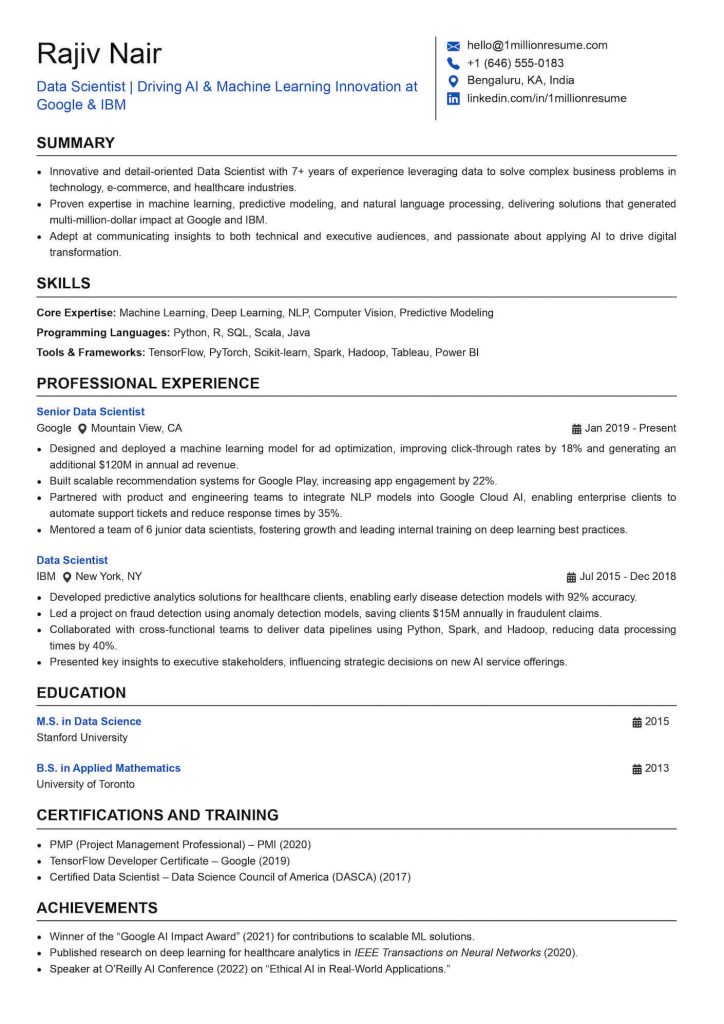
How ATS Systems Read Resume Layouts
ATS software works by scanning resumes and converting them into structured fields such as:
- Name and contact information
- Skills
- Work experience
- Education
- Certifications
The system then compares this information with the job description to determine how closely the candidate matches the role.
Most ATS systems read documents from top to bottom and left to right, which means complex layouts like multiple columns or tables can cause the system to read content in the wrong order.
For example, if a resume uses a two-column design, the ATS might read the left column entirely before the right column, mixing unrelated information together.
Why Resume Formatting Affects ATS Scores
Resume formatting directly impacts ATS parsing accuracy. When the system cannot properly read sections of a resume, it may fail to detect:
- Skills mentioned in the document
- Job titles and responsibilities
- Education details
This can lower the candidate’s ATS score ranking within the applicant pool.
Many recruiters report that formatting issues such as icons, graphics, or tables are one of the most common reasons resumes fail ATS parsing.
Basic Formatting Rules for ATS-Friendly Resumes
To pass resume screening successfully, your resume must be easy for an Applicant Tracking System to read and interpret. ATS software converts your resume into structured data and then analyzes it for keywords, skills, and experience.Designing a resume for ATS compatibility requires simplicity and consistency. The following formatting principles help ensure your resume is readable by both software and human recruiters.
Use a Simple One-Column Resume Layout
A single-column layout is the most reliable structure for ATS resumes. This format organizes information vertically and ensures the system reads sections in the correct order.
Benefits of a one-column layout include:
- Easier parsing by ATS software
- Clear structure for recruiters
- Consistent reading flow
Multi-column templates often look visually appealing, but they can disrupt ATS scanning and lead to missing information.
Use Clear and Standard Section Headings
ATS systems rely on standard section titles to categorize information.
Common headings recognized by ATS include:
- Professional Summary
- Work Experience
- Skills
- Education
- Certifications
Using creative headings like ”My Journey” or ”What I Bring to the Table” may confuse the system and prevent it from identifying the correct section.
Clear and conventional headings improve both ATS readability and recruiter scanning.
Maintain a Logical Resume Structure
A resume should follow a logical order that makes it easy for ATS systems to categorize information.
A common structure includes:
- Contact Information
- Professional Summary
- Skills
- Work Experience
- Education
- Certifications or Additional Sections
Keeping this structure consistent helps the ATS interpret your resume more accurately.
Recommended Resume Layout for ATS
An effective resume layout ensures your document is easy for both recruiters and an Applicant Tracking System to scan and interpret. A clear structure improves parsing accuracy and increases the chances that your resume will rank higher in ATS results. Creating a structured layout improves both ATS readability and recruiter experience.
Correct Order of Resume Sections
Most ATS-friendly resumes follow a simple hierarchy:
- Header: Name and contact details
- Summary: Short professional overview
- Skills: Key technical and professional abilities
- Work Experience: Professional history and achievements
- Education: Academic background
Placing the most important information near the top ensures it is detected quickly during scanning.
Proper Use of Headings and Subheadings
Headings should be visually clear and consistent. Best practices include:
- Using bold formatting for section titles
- Keeping headings larger than body text
- Avoiding decorative fonts or styling
Consistent headings help ATS systems recognize section boundaries and organize the information correctly.
How to Structure Bullet Points
Bullet points make resumes easier to read and help ATS systems identify individual achievements.
Effective bullet point formatting includes:
- One accomplishment per bullet
- Short and clear sentences
- Consistent punctuation and formatting
Avoid long paragraphs, as they reduce readability and make it harder for recruiters to scan the resume quickly.
ATS-Compatible Fonts and Text Formatting
The fonts and text formatting you choose can directly impact how accurately an Applicant Tracking System reads and interprets your resume. If the system cannot properly parse your text, important information such as job titles, skills, or achievements may be missed during screening.
Using simple fonts and consistent formatting simple fonts and ensures both ATS software and recruiters can easily read your resumes.
Best Fonts for ATS-Friendly Resumes
ATS software works best with standard professional fonts. Recommended options include:
- Arial
- Calibri
- Helvetica
- Times New Roman
- Georgia
These fonts are widely supported and ensure consistent readability across ATS systems.
Ideal Font Size for Resume Sections
Proper font size improves readability while maintaining a professional layout.
Recommended sizes:
- Name: 16-20 pt
- Section headings: 12-14pt
- Body text: 10-12 pt
Avoid extremely small fonts, as they may reduce readability during parsing.
Using Bold, Italics, and Underline Safely
Basic formatting styles can be used carefully to highlight important information.
Safe formatting practices include:
- Bold for section headings and job titles
- Italics for secondary details like company descriptions
- Minimal use of underlining
Overusing formatting styles may make the resume appear cluttered.
Resume Spacing, Margins, and Alignment
Proper spacing, margins, and alignment play an important role in making your resume easy to read for both recruiters and an Applicant Tracking System. Clean formatting ensures that the ATS can correctly separate sections and extract information without confusion.
A well-structured resume not only improves ATS compatibility but also makes it easier for hiring managers to scan your profile quickly.
Ideal Resume Margins for ATS Parsing
Standard margins help maintain a clean layout.
Recommended margins:
- 0.5 to 1 inch on all sides
Margins that are too small may cause formatting problems when resumes are converted during uploads.
Line Spacing and White Space Best Practices
White space makes resumes easier to scan.
Recommended spacing includes:
- Line spacing of 1.0 to 1.15
- Space between sections
- Clear separation between bullet points
Balanced spacing improves readability without increasing resume length.
Text Alignment Rules for ATS Compatibility
Text alignment should remain simple and consistent.
Best practices:
- Left-align most text
- Avoid center-aligned paragraphs
- Use consistent indentation for bullet points
Left-aligned text ensures proper reading order for ATS software.
Design Elements You Should Avoid in ATS Resumes
While visually appealing resumes may work well in creative industries, many of those design elements can confuse an Applicant Tracking System. ATS software reads resumes as structured text, and complex design features can interfere with how the system extracts and interprets your information.
To ensure your resume passes automated screening, it’s important to avoid certain design elements that may reduce ATS compatibility. Certain visual elements can interfere with ATS parsing.
Why Tables and Columns Can Break ATS Parsing
Tables often cause ATS software to read information incorrectly.
For example, the system may combine content from multiple cells or skip information entirely.
For this reason, most ATS experts recommend avoiding tables for structuring resumes.
Problems with Icons, Graphics, and Images
Many modern resume templates use icons or visual elements for design.
However, ATS systems typically cannot interpret:
- Icons representing phone numbers or email addresses
- Charts or graphs
- Images or logos
Important information embedded inside graphics may be completely ignored.
Why Headers and Footers Cause Parsing Errors
Some candidates place contact information inside document headers or footers.
Certain ATS systems do not scan these areas properly, which can cause key details to be missed.
To avoid this issue, contact information should be placed in the main body of the resume.
ATS-Compatible Resume File Formats
The file format you use when submitting your resume can affect how accurately an Applicant Tracking System reads and processes your information. Some formats allow ATS software to extract text easily, while others can cause parsing errors or missing content.
Choosing the right file format ensures your resume is properly scanned, indexed, and ranked during the hiring process. Choosing the correct file format ensures your resume can be read accurately.
PDF vs DOCX: Which Format Is Safer
Most modern ATS systems support both DOCX and PDF files, but DOCX is generally considered the safest option because it preserves structured text.
Some older systems may struggle with complex PDFs.
When in doubt, submitting a DOCX files is often recommended.
Avoid Image-Based Resumes
Resumes saved as images or scanned PDFs cannot be read properly by ATS systems.
Examples to avoid:
- JPG resumes
- PNG resumes
- Scanned documents
These formats prevent the ATS from extracting text information.
File Naming Best Practices
Even file names should follow professional conventions.
Recommended format:
First Name-Last Name-Resume
Avoid vague names like:
- Resume1
- FinalResumeUpdated
Clear file names help recruiters organize applications more easily.
ATS Resume Formatting Checklist
Before submitting your resume, it’s important to make sure it follows formatting practices that an Applicant Tracking System can easily read and process. Even small formatting mistakes can cause parsing errors that reduce your chances of passing the initial screening.
Use the following checklist to ensure your resume is ATS-friendly and recruiter-ready .Before submitting your resume, it is helpful to review key formatting guidelines.
Quick Formatting Checklist Before Applying
Use the following checklist to ensure your resume is ATS-friendly:
- Single-column layout
- Standard section headings
- Professional fonts
- Clear bullet points
- Consistent spacing
- Simple formatting without graphics
Checking these elements can significantly improve parsing accuracy.
Common Resume Formatting Mistakes to Avoid
Some common mistakes include:
- Using multi-column resume templates
- Adding icons or graphics
- Placing information inside tables
- Saving the resume as an image file
Avoiding these issues helps ensure your resume is processed correctly by ATS software.

Conclusion
An ATS-friendly resume format focuses on clarity, structure, and simplicity. Since Applicant Tracking Systems rely on text parsing and structured data, complex designs or unusual formatting can prevent the system from reading important information.
By using a clean layout, standard headings, professional fonts, and ATS-Compatible file formats, job seekers can ensure their resumes are easily interpreted by ATS software.
Ultimately, optimizing resume formatting not only improves ATS compatibility but also increase your ATS score and makes the document easier for recruiters to review significantly increasing the chances of moving forward in the hiring process.
Author – Ayush Panthri
Connect on LinkedIn

Reviewer – Kunal Saxena
Kunal is a seasoned Technical Resume Writer with over 13 years of experience working with startups, mid-sized firms, and top global companies like Goldman Sachs and EY. He brings deep domain expertise across tech, education, insurance, e-commerce, and investment banking.
He has helped hundreds of professionals from top firms—including Apple, Meta, Google, Adobe, and Amazon — land interviews and advance their careers globally. His approach blends real-world hiring insight with high-impact resume strategy.
Kunal is an active member of Career Thought Leaders and the Resume Writing Academy, staying current with global resume trends and recruiter expectations.
Connect on LinkedIn
Amit got 2 Offers with our resume builder

My experience was truly outstanding, I got 3-5 interview calls and 2 job offers. The resume wasn't just focused on my current job - it captured my consulting, technical and leadership skills as well. Plus this was much more affordable
Data Engineer - Deloitte